Posts

Showing posts with the label Java

Java | Apache Commons StringUtils

The Apache Commons library is utility library provides many features which lacks in existing Java Core Framework. It is widely used open sourced library. In this post, we are going to learn utility methods provided by StringUtils class. Unlike Java's String class, Apache StringUtils class methods are null-safe. This means no NullPointerExeception is thrown if null value is sent. Below are popular methods used - Complete list of methods can be found at Apache commons StringUtils methods StringUtils.isEmpty() / StringUtils.isBlank() This methods used to check if a String contains any text. Both of these return true if the String is empty. The method isBlank() will return true if a String contains only whitespaces. StringUtils.isNotBlank() Checks if a string is not empty (""), not null and not whitespace only. StringUtils.equals() This case sensitive method compares two strings, returning true if they represent equal sequences of characters. Two null references are considere...

Java | Debugging

Image
In the day-to-day life of a programmer, most of the time is spent in debugging. Writing a code can be easy, but fixing a bug can be a nightmare. The java applications can be debugged to check why application is not behaving as expected.  To debug a Spring boot application we have to start application in debug mode. The Spring boot application we created in last post can be debugged as follows -  Intellij Idea -  Once the application is started you can add debug points in code by double-clicking on desired line. As soon as we hit a request, it can be seen that the code execution stopped where debug is added. We check the variables in the right hand side of debug mode. This is useful to check what value is being set. It also has options to mute debug points if we want to continue with normal execution etc.  Most of the IDEs support the Evaluate function. To check some logic, we can right click on code and select Evaluate Expression option where we can add custom code t...

Spring Boot | Sample REST Application

Image
In this post we are going to write a Simple REST Application in Spring Boot. Spring Boot has inbuilt tomcat which makes an application start without the need to have any application/web server. Though we can always deploy applications in web servers too. For this tutorial we will be using Maven for dependency management. Step 1. Add all required Spring dependencies in your pom file We can use below sample pom file to start with or go to https://start.spring.io/ to kick start your spring boot application. Step 2. Spring starter class Spring Boot uses @SpringBootApplication to auto configure some of spring configuration. You can find more info on  SpringBoot details Step 3. Application Controller We will be using MVC pattern to separate our restful layer from the service layer.   In our REST service we use  @RestController  annotation. It is combination of @Controller and @ResponseBody annotations. We created CustomerController to return customer d...

Java | Shutdown Hooks for Java Applications

When java application is stopped, its used services/processes needs to be shutdown gracefully. Java shutdown hooks provides way to gracefully stop the services/processes. We can write our own logic to do things when shutdown hooks are called.  Shutdown hooks are called when -  1. When the main thread exits, the JVM starts its shutdown process 2. Sending an interrupt signal from the OS. Eg. Ctrl + C or OS Shutdown 3. Calling System.exit() from Java code Shutdown hooks are basically initialized but unstarted threads. Shutdown hooks are only called on above mentioned conditions, it is not called in case of jvm shut down abruptly eg. power failure etc.

Java 8 | Writing custom Stream API using builder pattern

In this post we are going to create simple Java 8   Stream API using builder pattern. Check builder pattern post here .  API will provide below four methods - sort - Sort the list limit - Fetch only N numbers from the list distinct - Remove duplicates from the list forEach - Print the list

Java 8 | Fetch top N unique numbers from list

Below Java 8 example shows how to fetch top N unique numbers from ArrayList. Traditional looping will require more logic to first remove duplicates, sort numbers and then store N numbers to different list. Java 8 provides stream API to do all the above steps in single line of code.  Descending order (N = 3)

Apache Spark | Run first spark program

Image
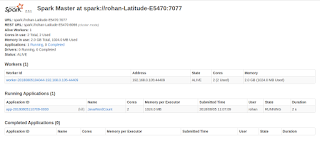
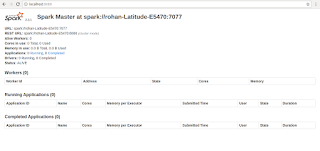
In this post we are going to run sample spark program. If you want to setup spark locally go to this post . In the last post we created slave node with 2 cores and 2g memory. This worker node will be used by master to run your spark jobs. Spark installations provides some sample programs to run on cluster. This can be found at below location. We will be running JavaWordCount program locally in spark cluster.

Apache Spark | Setup Spark in local

Image
In this post we are going to setup Apache Spark  in Ubuntu machine. Apache Spark is high performance engine  for Big data such as batches, and streaming of data. Spark provides up-to 100x times speed than any other engines. Spark is compatible with Java, Python, R. Step 1 : Download Spark installations from website . This will download  spark-2.3.1-bin-hadoop2.7.tgz in your local. Extract files from zip as below.

Java | Builder Design Pattern

Java POJO classes can be created using different design patterns. Below is example how Builder pattern works. Normally, Simple java POJO class setter-call has void return type. Builder pattern replace void return type and returns current object of class(ie. return this). Builder pattern can be used to replace parameterised constructor. Also when we create object the code is more readable. Example :

Spring | Autowiring Qualifier

Spring provides @Qualifier annotation to refer correct bean while doing autowiring. Suppose we have interface IService which has two concrete implementation. When we try to Autowire IService object in any other class it will throw exception as there are two beans. Spring Qualifier is used in such situation to place object of correct implementation class to autowired object.   Now, above iservice object will hold object of IServiceImplTwo class.

Spring | JMS Listener via JmsListener annotation

Spring framework provides annotation based configuration for dependency injection. Normally, MessageListener  interface needs to be implemented in Queue/Topic receiver class for incoming messages. The overridden onMessage method in that class handle the incoming message. Spring provides below annotations to enable jms communication. @JmsListener  annotation can mark any method to handle message.  @EnableJms  annotation to detect and register  @JmsListener  methods for jms messages. Below is class to handle jms message. @JmsListener requires default jms container factory configuration. Add below lines in bean conf file for this. Please refer this post for conf file. Deploy war file to JBoss server and send sample message from Gems tool.

Spring | Using TIBCO EMS with Spring framework

TIBCO EMS can be use with Spring Framework to support message publishing and subscription. Spring provides JMS template to send JMS messages and @JmsListener/ MessageListener to subscribe it. Steps 1 : Create new project in eclipse or IntelliJ Idea Create new project with Spring dependency. We can use maven to add all required libs for this project. Maven takes care of adding referred java libs to build path. TIBCO JMS jars need to be added to build path. Pom.xml will be as follows. As you can see in above pom file we have added TIBCO JMS and Spring JMS dependency. Step 2 : Create JMS bean configuration file(Jms-conf.xml) Next we will create bean configuration file. It will set JNDI and JMS properties. We can use same JMS listener class to subscribe multiple queues and topics. Spring bean configuration take care of JMS transport setup. Env variables values can be provided via properties file. Step 3 : Create JMS Queue/Topic sender and Listner ...