Posts

Showing posts with the label TIBCO

TIBCO | Admin - Rolling deployment
Image
One of the important feature of enterprise application is to implement changes dynamically without affecting user experience. TIBCO applications can be configured in similar ways. This is called as rolling deployment or restart. We can dynamically change application with new EAR file and/or Global value configuration. Note : This is applicable only where deployed application is in multi-instance state. ie. app is deployed on 2 or more machines.

TIBCO | Types of variables

Image
In this post we will discuss about different types of TIBCO variables. TIBCO application can uses any of this variables to manipulate data and logic. TIBCO variable types are as follow Global variables Process variables Shared variables

TIBCO | For Loop - Accumulate output

Image
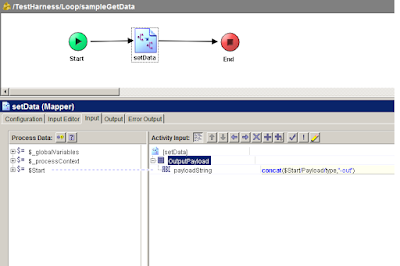
In this post we will check how TIBCO for loop works. TIBCO provides Group Activity to iterate over processes or activities. Loops can be different types eg. For Loop, While util loop, if loop, repeat on error etc. TIBCO group can loop over sub-process and accumulate output in end activity to be used by next activities. TIBCO For loop with Accumulate output repeats over process/activity and return output of each iteration in output activity. This is helpful where we want to call sub-process repeatably with different input parameters and store each output in some variable.

TIBCO | Working with REST and JSON Plugin

Image
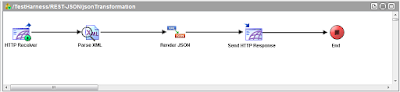
In this post we will check how to handle JSON datatype using TIBCO Designer. TIBCO Designer does not comes with built in JSON Palette in version 5.7.X. We need to install REST Plugin in order to use REST/JSON Palettes.  JSON  is lightweight datatype used in many systems mainly in web applications. JSON is lightweight as it does not require any XSD. We still can  use XML XSD in TIBCO to convert XML to JSON and vise versa. Activities : Render JSON - Converts XML data string to JSON String Parse JSON   - Converts JSON String to XML data string 

TIBCO | JNDI Server & JMS Instance creation

Image
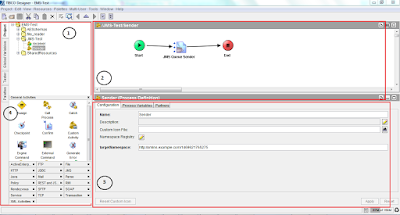
In this post we will be creating TIBCO JNDI server and other instance pointed to JNDI server. First lets see what is mean by JNDI. It is   Java API for a directory service that allows Java software clients to discover and look up data and objects via a name. TIBCO EMS uses JNDI concept to lookup for EMS objects and its relations in messaging service. While developing enterprise level TIBCO solution it is advise or say standard practice to create one JNDI server(also one backup JNDI server) and other instance servers according to the functionality or domains. In this tutorial we will be creating one JNDI server and two domain servers.

TIBCO | Decision Service with XSLT & DB

Image
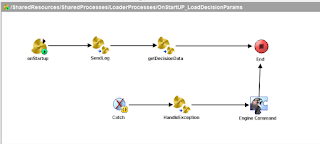
TIBCO BusinessEvents provides DecisionManger to generate certain results based on input conditions. This is useful when TIBCO BusinessWorks needs to call other processes based on input params. TIBCO BusinessWorks sends request to DecisionEngine in return BusinessEvents - DecisionManger will provide some results. In this post we will implement DecisionManager using XSLT & DB. One more advantage of this is that it uses DB to store input rules, so rules can be added at run time and cache can be refresh either via publishing simple message on topic or restarting the process instance.

TIBCO | BW Project Strucutre

Image
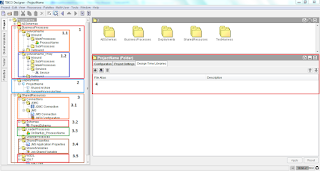
As explained in earlier post TIBCO Designer is used to develop Enterprise middleware applications. It is necessary to follow certain structure to develop BW Project to ensure low complexity and easier component understanding. Standard structure also allows to follow certain software design patterns in enterprise applications.

TIBCO | Middleware

Image
TIBCO is most widely used middleware product in market. TIBCO is providing integration solutions from last 2 decades(1997 - Current). TIBCO provides solutions for Integration, Orchestration, Business Process Management and Analytics. TIBCO Products TIBCO AMX BusinessWorks (Aka TIBCO BW)

EAI Implementation products

The last post was about what is EAI. In this post i am going to explain and use of different EAI products. In any software industry the EAI is must there to connect different components. There are SAP CRM systems, Billing systems, Salesforce systems, Oracle systems needs to be interconnected. There are different EAI products available in market. Based on the requirement the EAI product is chosen.

What is EAI?

Image
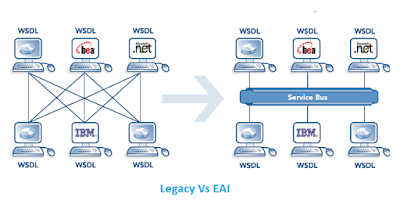
From Wikipedia's definition the Enterprise application integration (EAI ) is the use of software and computer systems' architectural principles to integrate a set of enterprise computer applications. But what it exactly mean? Before going to definition of EAI, think of legacy banking computer systems connected to each other in Ad hoc manner. Inventory component is storing large database of users. Accounting component manages complex calculations of end users. Front end components are consumed by bank officials and bank users. Each of this component is connected and requesting each other for information. Those components are used to connected point to point or one to many manner.